SIP GSM gateway software for Windows
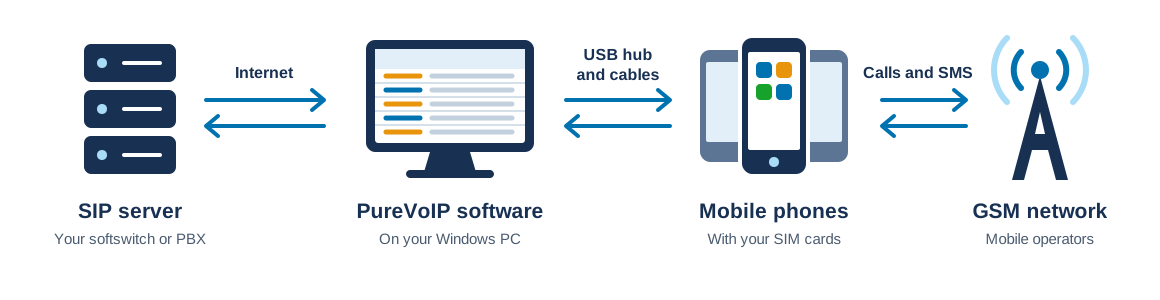
Plug your phones into a powered USB hub, run PureVoIP on a Windows PC, and terminate or originate SIP calls through your own SIM cards. No Bluetooth dongles, no static IP, no rooting.
4.9
One-time payment · Hub, cables and license included · Free remote setup
Three steps, all from the software screen. No scripts or code.
Run PureVoIP and register it to your SIP server with a normal SIP account.
Connect phones to the USB hub. Each one is detected in about 5 seconds and appears as a free channel.
Send calls from your SIP server to that account. PureVoIP distributes them across the connected phones.
The six things clients ask about first. The features page has the rest.
GSM call termination, origination and DID numbers on the same setup.
Terminate SIP calls to WhatsApp and Telegram through the same phones.
Send and receive SMS, terminate SMPP traffic alongside calls, check balance and recharge SIMs.
Route by ACD, ASR, channel load or sequence, and assign each network prefix to specific channels.
Watch channel status, ASR, ACD and remaining minutes in the software or from this website.
G.729, Opus, PCMU, PCMA and more, with transcoding between them built in.
The demo sets up two SIP accounts, registers PureVoIP, and completes a call through a connected Samsung phone. WhatsApp calls work the same way.
Demo notes and setup detailsWe ship the powered USB hub and the cables, and license the software to you. You add a Windows PC, your phones and your SIM cards.

One-time payment. Hub, cables, license, remote setup and shipping are included in every package.
$160 per channel
$140 per channel
$133 per channel
Join more than 10 thousand clients worldwide who trust PureVoIP.

The device come with metal cover for heavy duty , Excellent software!!! Worked as expected
The solution is excellent , the interface is nice and easy to manage , nice to see SIPElectron there
The technical support helped me a lot to track a problem related to my old computer for several hours , the problem was solved
It was an amazing experience , i built great setup with purevoip 50 channels and everything is Ok
The software license with all features and upgrades, the powered USB hub, USB cables, remote setup and shipping. You buy the phones locally.
No to all three. Phones connect by USB only, and the software receives traffic through a registered SIP account.
It depends on the PC. A Core i5 with 4 GB RAM runs 60-80 channels. For more, use a stronger PC or a second one.
By bank transfer, Western Union or USDT. Contact us and we will send you the payment details.
We reply with a quote, the payment details and a delivery date. Need something the software does not do yet? Our developers take custom work: development@pure-voip.com
 Easy and Powerful!